Theming & Design System
Customize Netcatty to match your aesthetic soul
A terminal is a personal space. You stare at it for 8 hours a day. It should be beautiful.
Netcatty separates "UI Theming" (The window, buttons, sidebar) from "Terminal Theming" (The text buffer colors).
UI Theming (The Application Shell)
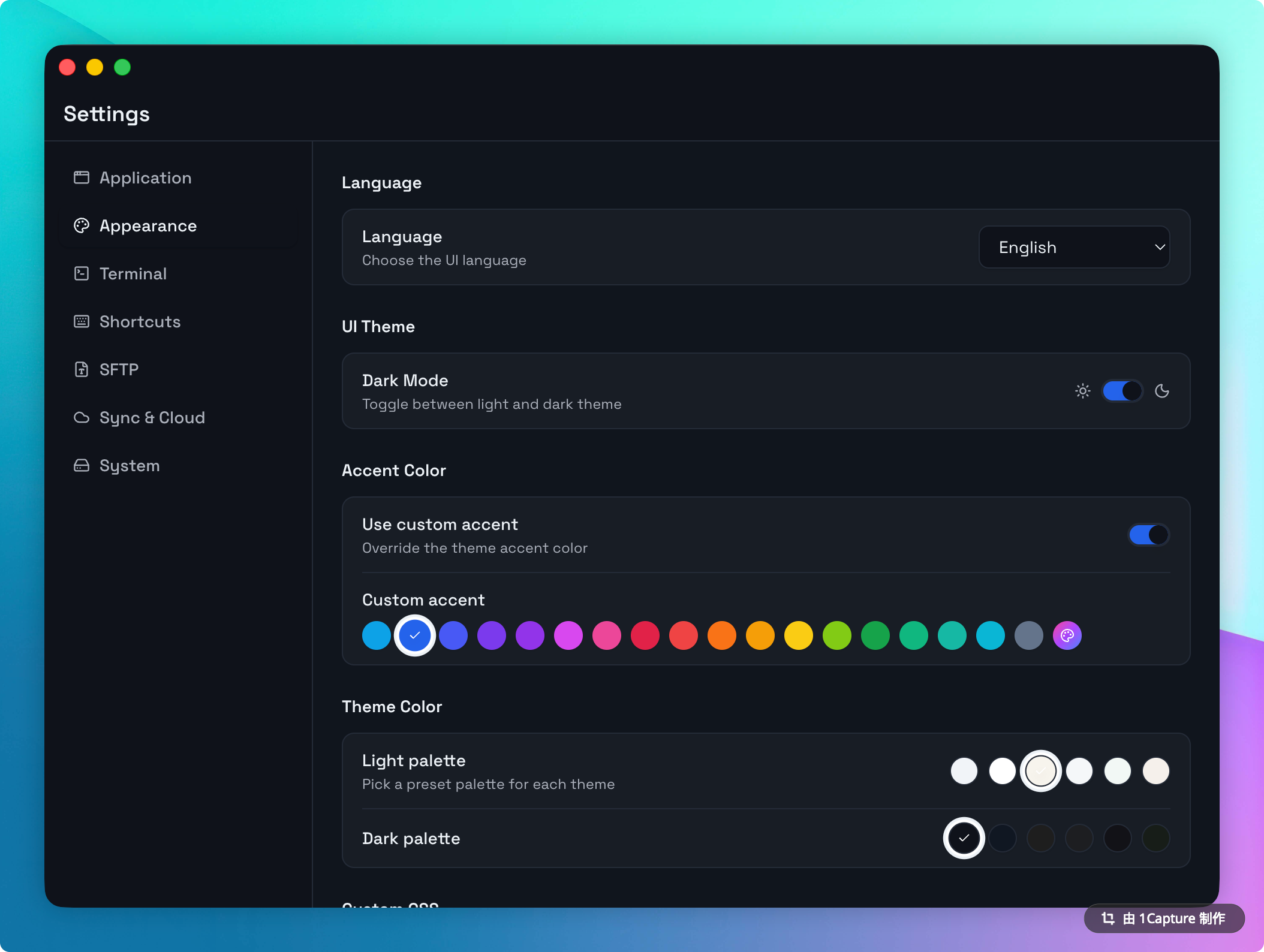
Netcatty follows the system preference (Dark/Light) by default, but you can override this.
UI Theme Presets
We provide a set of curated theme presets for both Light and Dark modes.
- Light Themes: Snow (Default), Pure White, Ivory, Mist, Mint, Sand.
- Dark Themes: Midnight (Default), Deep Blue, VS Code, Graphite, Obsidian, Forest.
Accent & Highlights
By default, each theme use its own primary accent. You can override this in Settings > Appearance to use a custom color:
- Presets: 18 curated colors including Blue, Emerald, Amber, and Rose.
- Custom: A full color picker allowing you to define any HSL value.
Custom CSS
For power users, Netcatty allows you to inject custom CSS directly within the Appearance settings.
You can inspect the UI (using Cmd+Option+I to open DevTools) and override any class using the built-in editor.
/* Example: Make the terminal buffer more compact */
.xterm-rows {
  line-height: normal !important;
}
Terminal Theming (The Buffer)
This controls the colors of the shell output (ANSI colors).
Terminal Theme Format
A terminal theme is a JSON object defining background, foreground, and individual ANSI color properties.
{
  "id": "my-theme",
  "name": "Cyberpunk",
  "type": "dark",
  "colors": {
    "background": "#0d0221",
    "foreground": "#ff006e",
    "cursor": "#ffbe0b",
    "selection": "#3a0ca3",
    "black": "#0d0221",
    "red": "#ff006e",
    "green": "#8338ec"
  }
}
Netcatty includes 60+ built-in terminal themes covering popular color schemes like Dracula, Nord, Catppuccin, Tokyo Night, and more. You can select any of them from Settings > Terminal > Theme.
Typography
Font Family
Netcatty will render any font installed on your OS.
- Ligatures: We support operating system ligatures. Use fonts like Fira Code or JetBrains Mono.
- Nerd Fonts: Essential for modern prompts like Starship or Powerlevel10k. We detect if you are using a Nerd Font and enable the icon glyph range automatically.
Line Height & Letter Spacing
- Line Padding: Add additional vertical space between lines (0-10px) to make the text more breathable.
- Custom Weights: Customize both Regular and Bold font weights independently (100-900).
Hardware Acceleration
Netcatty uses WebGL 2.0 by default for ultra-smooth scrolling on 4K displays. If your hardware doesn't support it, we automatically fall back to Canvas rendering.