
Cluster Management (Broadcast)
Sending commands to multiple servers simultaneously
Managing one server is easy. Managing 50 servers requires specific tools. Broadcast Mode turns Netcatty into a lightweight orchestration tool (like Ansible, but interactive).
In this guide, we'll walk through a real-world cluster maintenance scenario.
The "Cluster Update" Scenario
Goal: You have 4 web servers (web-01 to web-04). You need to check their uptime, free memory, and run a security patch.
Launch the Fleet
- Go to the Vault.
- Select your "Web Servers" group (or
Cmd+Clickthe 4 specific hosts). - Right-Click > Connect.
- Netcatty opens 4 tabs.
Tile the View
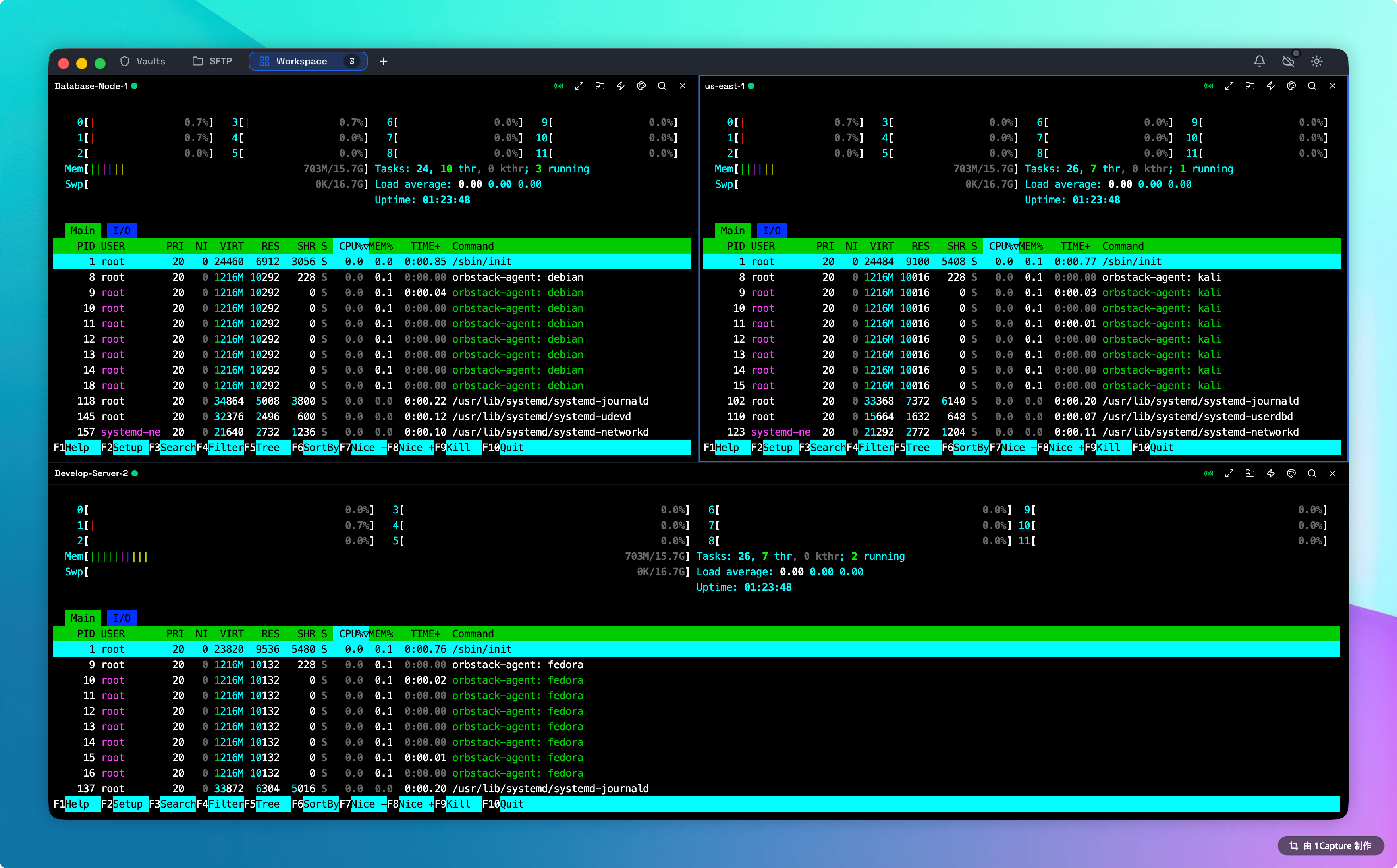
You cannot broadcast to tabs you cannot see. Click the Grid Layout icon in the toolbar and select 2x2. Now you have a "Command Center" view of all 4 nodes.
Engage Broadcast
Click the Broadcast (Radio) icon in the toolbar. Visual Check: The Broadcast (Radio) icon in the toolbar turns green. This indicates that input synchronization is active.
Execute
Type uptime and hit Enter.
Result: All 4 screens execute the command simultaneously.
Type free -h and hit Enter.
Result: You can compare memory usage visually across the fleet.
Safety Protocols
Broadcast mode is raw. It does not "know" about the state of the shell.
The "Prompt Drift" Danger
If Server A is at a bash prompt $ and Server B is inside a nano editor:
- Typing
rm -rf /will delete files on Server A. - It will just type text into the file on Server B.
- Rule: Always ensure all terminals are at a clean prompt before engaging broadcast. Press
Ctrl+Ca few times to reset state on all panes.
Partial Broadcasting
You don't have to broadcast to everyone.
- Group A: Hold
Command(Mac) and click the header of Pane 1 and Pane 2 to "select" them (Active Focus). - Engage: Click Broadcast.
- Result: Only the selected panes receive input.
Advanced Pattern: The "Blue-Green" Deployment
You can use Broadcast to manage a rolling restart.
- Open 6 Terminals.
- Select Top 3 (Blue Cluster). Broadcast:
systemctl stop app. - Perform maintenance.
- Broadcast:
systemctl start app. - Select Bottom 3 (Green Cluster). Repeat.
Snippets Integration
Snippets work in Broadcast mode! You can prepared a complex, multi-line patch script and execute it on 50 servers with one click by using the Command Palette (Cmd+P) -> Run Snippet.