
Protocols (Serial, Telnet)
Beyond SSH - Managing physical hardware and legacy systems
While SSH is the dominant protocol for 99% of cloud infrastructure, the physical world runs on Serial (RS-232), and the legacy world still clings to Telnet. Netcatty is built to be a universal tool, not just a cloud tool.
Smart Connect (Quick Connect)
The fastest way to connect is using the search bar. Instead of clicking through menus:
- Focus the search bar (
Cmd + KorCtrl + K). - Type your connection string:
user@hostname. - Press Enter.
- Netcatty will automatically determine if a matching Host exists in your Vault. If not, it launches the connection wizard.
Serial Connections (COM / TTY)
Serial connections are fundamentally different from network connections. There is no IP address, no handshake, and no "Try Again". It is a raw stream of bytes over a copper wire.
Hardware Prerequisites
To connect to a router, switch, or embedded board (Raspberry Pi, Arduino), you typically need a USB-to-Serial Adapter.
- Common Chips: FTDI (High quality, plug-and-play), Prolific PL2303 (Common, driver issues on macOS), CH340 (Common in hobbyist electronics).
- Driver: Ensure you have the VCP (Virtual COM Port) driver installed for your specific chip.
Connection Parameters (The "8N1" Standard)
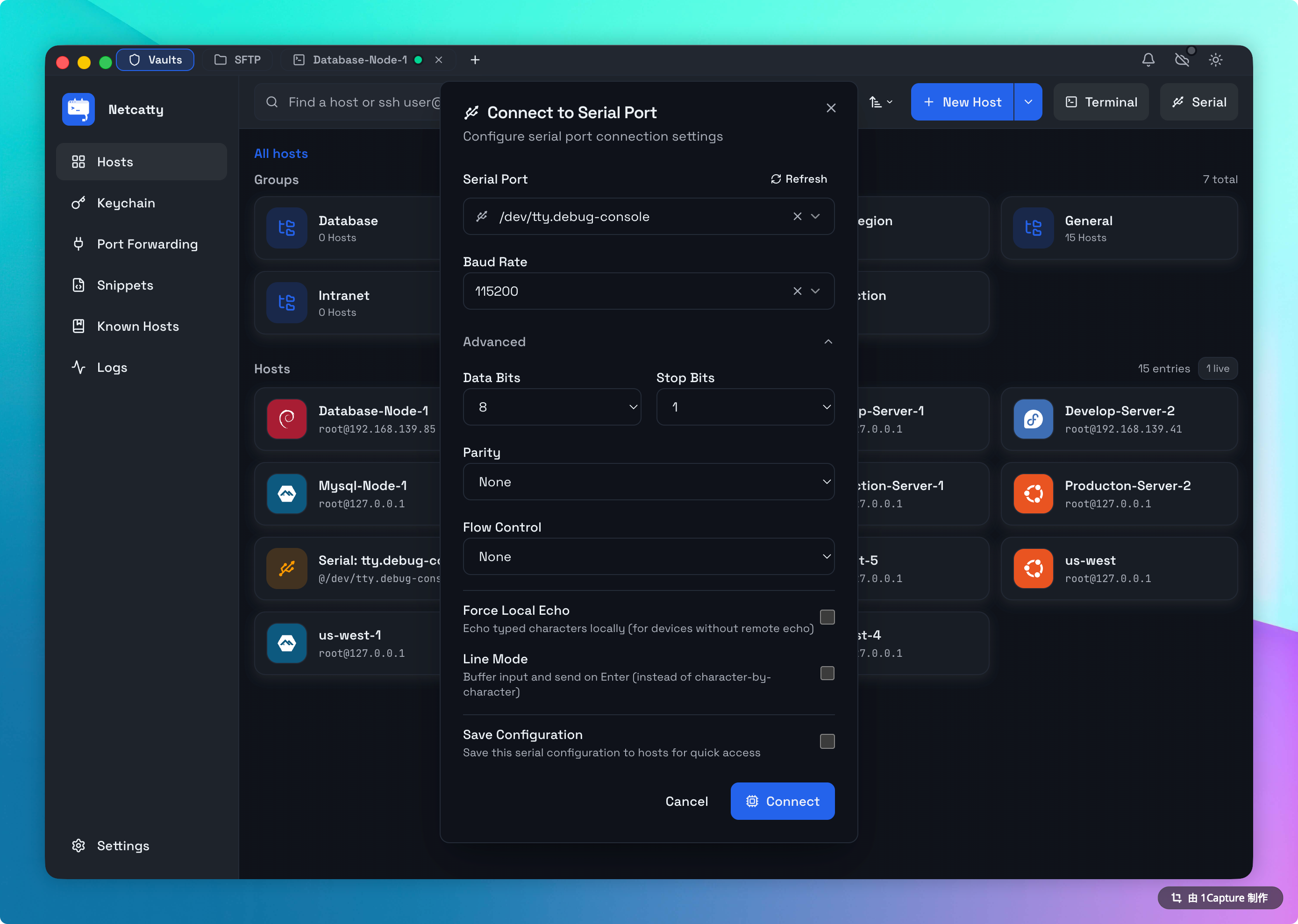
When configuring a Serial host, you must match the device's expectations exactly. A mismatch results in "gobbledygook" text.
- Port Path:
- macOS:
/dev/tty.usbserial-XXXXor/dev/tty.usbmodemXXXX. - Linux:
/dev/ttyUSB0or/dev/ttyACM0.- Note: You typically need to add your user to the
dialoutgroup (sudo usermod -aG dialout $USER) to access these ports without sudo.
- Note: You typically need to add your user to the
- Windows:
COM3,COM4(Check Device Manager).
- macOS:
- Baud Rate: The speed (bits per second).
- 9600: The standard for Cisco / Networking gear.
- 115200: The standard for modern Embedded Linux / Raspberry Pi consoles.
- Data Bits: Almost always
8. - Parity: Almost always
None("N"). - Stop Bits: Almost always
1.
Hence, the shorthand "115200 8N1".
Telnet (RFC 854)
Telnet is unencrypted text over TCP. Warning: Never use Telnet over the public internet. Passwords are sent in clear text.
Use Cases
- Legacy Industrial Gear: Power Distribution Units (PDUs), old managed switches, and factory PLCs often only support Telnet.
- Debugging Services: You can use Netcatty's Telnet mode to debug raw TCP services.
- Scenario: Debugging an HTTP server.
- Host:
google.com - Port:
80 - Protocol: Telnet
- Action: Connect, then type
GET / HTTP/1.1and hit Enter twice. You will see the raw HTTP response headers.
Mosh (Mobile Shell)
For unstable connections (shuttle Wi-Fi, cell data), Netcatty supports Mosh.
- Requirement:
mosh-servermust be installed on the remote host. - Behavior: Predictive echo and roaming support (switch from Wi-Fi to 5G without disconnect).
- Settings: You can specify a custom
mosh-serverpath in the host's Advanced settings panel.
Local Shell
Netcatty can functionally replace Terminal.app, iTerm2, or PowerShell.
Shell Detection
- macOS/Linux: Netcatty reads your
$SHELLenvironment variable. If you usezshwith Oh-My-Zsh, it loads securely. - Windows:
- You can create separate "Local Hosts" for different shells.
- PowerShell: Use path
powershell.exe. - WSL 2: Use path
wsl.exe. - Git Bash: Point to the
bash.exeinside your Git installation.
Font Ligatures
Local shells benefit greatly from Netcatty's WebGL renderer. Try setting your font to "Fira Code" (if installed) to see arrows => and logic symbols != rendered beautifully.